Let’s create a web project with Ganma (with presentation)

When presenting a plan, the process of summarizing the plan using ChatGPT and creating presentation materials using Gamma can be dramatically streamlined by leveraging AI, enabling the rapid creation of professional-quality materials. In this case, we used the SCW (Seaside Cloudworks) plan that we had been working on with ChatGPT and created the materials in about 10 minutes.

The procedure is explained in detail below.

1. Content Generation and Summarization with ChatGPT

The first step involves utilizing ChatGPT to efficiently prepare the draft content and key points for your proposal.

  • Drafting and Structuring: You can prompt ChatGPT with your proposal’s theme and overview to generate initial drafts, presentation outlines, and structural elements.•
  • Detailed Research and Reporting: For more in-depth information, leverage ChatGPT’s Deep Research capabilities (or Gemini Deep Research) to efficiently gather necessary data and compile it into a comprehensive report. This significantly cuts down research and summarization time. The output from deep research tools like Perplexity or Gemini Deep Research can be directly used as source text for Gamma.
  • Voice Input for Idea Generation: ChatGPT’s voice input feature allows you to verbalize your ideas and insights, which are then transcribed into text, creating a highly efficient workflow. This transcribed text can be directly pasted into Gamma for slide creation.
  • Quality of Source Text: While Gamma has its own text generation features, it’s recommended to generate the core content using ChatGPT (or other advanced AI text generation tools) and then paste it into Gamma, as Gamma’s internal text generation accuracy for long-form content might have hallucinations. The focus should be on Gamma’s strong presentation creation capabilities from existing text.

Summary of the project posted this time(in Japanese)

Seaside Cloudworks(SCW)は、技術の進化と変化を背景にした仮想のITスタジオです。物語性を持たせた世界観を通じて、IT技術者や関係者が気軽に共感し、学べる場を目指しています。Webサイトはこの世界観を表現する主要なプラットフォームとして、カジュアルかつ信頼感のあるトーンで設計します。物語形式の連載や技術解説コラムを通じて、変化する技術環境とSCWの挑戦を分かりやすく伝えます。デザインは「海辺」と「クラウド」をテーマにし、親しみやすく読みやすいユーザー体験を重視。スマートフォン対応や快適なナビゲーションも考慮しています。この企画により、ブランド認知の向上や技術者コミュニティとのつながり強化を目指し、今後の採用・顧客獲得支援につなげていきます。

Summary of the project posted this time(translated)

Seaside Cloudworks (SCW) is a virtual IT studio that reflects the evolution and changes in technology. Through a narrative-driven worldview, it aims to create a casual and engaging space where IT professionals and stakeholders can connect and learn. The website serves as the primary platform to express this worldview, designed with a casual yet trustworthy tone. Through serialized stories and technical explanation columns, it clearly communicates the evolving technological landscape and SCW’s challenges. The design is themed around “seaside” and “cloud,” prioritizing a user-friendly and easy-to-read experience. It also considers smartphone compatibility and comfortable navigation. This initiative aims to enhance brand awareness, strengthen connections with the technical community, and support future recruitment and customer acquisition efforts.

2. Automatic Presentation Generation by Pasting Text into Gamma

Once your content is prepared in ChatGPT, you can transform it into a presentation using Gamma’s “Paste text” feature.

  • 1.Pasting Text: Open Gamma, select “Create New (AI)”, choose “Paste text”, and paste the content generated by ChatGPT.
  • 2.Automatic Outline and Generation: Gamma’s AI will instantly propose a slide outline (structure) based on your pasted text. Within seconds, it automatically generates the entire presentation. Even lengthy texts can be summarized and formatted into slides by the AI. The AI efficiently divides the content into logical “cards” or slides.
  • 3.Design and Layout Selection: From the generated outline, you can select a presentation theme. Gamma offers over 30 diverse templates, allowing you to change the entire design with a single click. You can also create custom themes incorporating your brand colors, logo, and fonts (available for Pro plan users).
  • 4.AI Images and Visuals: The AI automatically generates and places relevant images and icons based on the text content. If you’re not satisfied with the images, you can regenerate them, search free stock photo sites like Unsplash, or upload your own custom images. You also have the option to generate the presentation without images or with image placeholders to fill later.
  • 5.Content Editing and Refinement: After generation, you can edit and refine individual slides using Gamma’s AI by clicking the “sparkle icon”. This allows you to adjust text length, change tone (e.g., “make more professional”), and ask the AI to expand content. Gamma’s interface, similar to Notion, allows you to “fold” multiple pieces of information within a single slide, eliminating the need to constantly adjust information density to fit a fixed slide frame.
  • 6.Adding Diverse Elements: Gamma provides an intuitive drag-and-drop interface to easily add and arrange elements like text boxes, lists, callout boxes (including colorful emphasis boxes for info, warnings, notes, code blocks, tables of contents, footnotes, dividers), buttons, graphs (bar, line, pie, calendars, Gantt charts), and embedded media such as YouTube videos, TikTok, and Spotify.

3. Presenting and Exporting

Once your presentation is complete, Gamma offers various ways to use it.

  • Direct Presentation: You can present directly from the Gamma app in a clean, distraction-free “Presentation” mode, ideal for meetings or webinars.
  • Shareable URL: Generate a public URL for your presentation to easily share it with team members or clients. Access permissions can be finely tuned (full access, edit, comment, view).
  • Diverse Export Formats: Finished presentations can be exported as PDF, PowerPoint (.pptx), PNG images, or Google Slides. Notably, PowerPoint exports maintain formatting well. PNG export is convenient for social media.
  • Analytics: If shared, you can track daily views and viewing time distribution per card (slide), providing insights into audience engagement.

SCW Project Presentation (Gamma) in Japanese

Seaside Cloudworks(SCW)~海辺から始まる新しいITの物語~

Since I just generated it without adding any particular touches, it took about 10 minutes to complete, but I was very satisfied that I could quickly create a first draft like this. Considering that I would have had to create each one myself, I think it saved me a considerable amount of time. Please don’t worry about the content.

Posted in AI | Tagged , , | Leave a comment

A thorough comparison of slide generation AI (Gamma, Genspark, Canva AI Slides, SlidesAI)

Some people may want to use AI technology to streamline slide creation but are unsure which tool to choose.
Others may find it tedious to compare the features and usage of each tool.

In this article, we will thoroughly compare several popular tools for those who want to use AI for slide creation
and explain the features of each tool in detail.

– Gamma’s features and benefits
– Genspark’s ease of use
– Canva’s design features

We provide detailed explanations of the above.

This information will be extremely useful for those struggling with slide creation.
Please refer to it to streamline your slide creation process.

Overview of AI slide generation tools

AI slide generation tools are an innovative technology that greatly streamlines the creation of presentations. This allows users to save time while quickly creating high-quality slides. These tools are particularly popular in business and education settings.

AI slide generation tools are important because creating slides manually is time-consuming and labor-intensive. AI analyzes data and suggests optimal layouts and designs, allowing users to focus on content. Additionally, the tool automatically adjusts visual elements, enhancing the overall quality of the presentation.

For example, tools like Gamma and Genspark instantly generate slides based on the information entered by the user. Specifically, they select images and fonts aligned with the theme, achieving a professional finish. In this way, AI slide generation tools are becoming the new standard for presentation creation.

AIでスライド作成が変わる理由

AIを活用したスライド作成が変わる理由は、効率性とクオリティの向上にあります。

従来の手法では、スライド作成に多くの時間と労力が必要でした。特に、デザインやレイアウトを考えることは、専門的なスキルを要する場合が多いです。しかし、AIツールを利用することで、これらのプロセスが自動化され、誰でも簡単に魅力的なスライドを作成できるようになります。

例えば、AIはユーザーが入力したテキストや画像をもとに、最適なデザインや配色を提案します。これにより、デザインに不安を感じる方でも、プロフェッショナルな仕上がりを実現できます。また、AIは大量のデータを分析し、トレンドに基づいたスライドを生成するため、最新の情報を反映させやすくなります。

このように、AIスライド生成ツールは、時間を節約しながらも高品質な成果物を提供するため、多くのビジネスシーンで注目されています。あなたも、これらのツールを使うことで、スライド作成のハードルを大幅に下げることができるでしょう。

Why AI is changing slide creation

The reason AI is changing slide creation is because it improves efficiency and quality.

Traditional methods required a lot of time and effort to create slides. In particular, designing and laying out slides often required specialized skills. However, by using AI tools, these processes can be automated, allowing anyone to easily create attractive slides.

For example, AI can suggest the best design and color scheme based on the text and images entered by the user. This allows even those who feel unsure about design to achieve a professional finish. Additionally, AI analyzes large amounts of data and generates slides based on trends, making it easier to incorporate the latest information.

In this way, AI slide generation tools are gaining attention in many business scenarios for their ability to save time while delivering high-quality results. By using these tools, you can significantly lower the barriers to slide creation.

GammaとGensparkの特徴

GammaとGensparkは、AIスライド生成ツールの中でも特に注目されています。これらのツールは、プレゼンテーション作成の効率を大幅に向上させるため、多くのユーザーに支持されています。特に、時間がないビジネスパーソンや学生にとって、これらのツールは非常に便利です。

Gammaは、直感的なインターフェースを持ち、ユーザーが簡単にスライドを作成できるように設計されています。デザインテンプレートも豊富で、魅力的なプレゼンテーションを手軽に作ることが可能です。一方、Gensparkは、AIによるコンテンツ生成が特徴で、ユーザーが入力した情報を基に、関連するスライドを自動で提案します。このため、アイデアをすぐに形にすることができます。

例えば、Gammaを使えば、数クリックでプロフェッショナルなスライドが完成します。Gensparkでは、特定のテーマに基づいてスライドを生成するため、プレゼンテーションの内容に一貫性を持たせることができます。これにより、時間を節約しつつ、質の高いプレゼンテーションを実現できるのです。

Features of Gamma and Genspark

Gamma and Genspark are particularly noteworthy among AI slide generation tools. These tools are supported by many users because they greatly improve the efficiency of presentation creation. They are especially convenient for busy businesspeople and students.

Gamma has an intuitive interface and is designed to allow users to easily create slides. It also offers a wide variety of design templates, making it easy to create attractive presentations. On the other hand, Genspark is characterized by AI-driven content generation, automatically suggesting relevant slides based on the information entered by the user. This allows ideas to be quickly turned into tangible results.

For example, with Gamma, professional-quality slides can be completed with just a few clicks. Genspark generates slides based on specific themes, ensuring consistency in the content of the presentation. This enables users to save time while achieving high-quality presentations.

Features and Usability of Genspark

Genspark is gaining attention as an AI tool specialized in slide creation.

This tool is characterized by its ability to automatically generate slides based on the information requested by the user.

In particular, for those who want to focus on visual design, the tool offers a wide variety of templates, making it easy to create attractive slides.

Additionally, Genspark features an intuitive and user-friendly interface, designed to be easy to operate even for beginners.

Furthermore, the content suggested by the AI provides information suitable for various scenarios, such as business presentations and educational materials.

While many may find slide creation challenging, using Genspark can help alleviate those concerns.

In this way, Genspark is a powerful tool for achieving efficient and sophisticated slide creation, earning it widespread support from users.

The Potential of Canva and AI Slides

Canva is widely known as a design tool, but its potential for slide creation has greatly expanded through the use of AI technology. In particular, AI-powered features enable users to create compelling presentations in a short amount of time. This allows users to save time while delivering high-quality slides.

By leveraging AI, design suggestions and automatic content generation are provided, enabling even beginners to achieve professional-quality results. Additionally, combining Canva’s extensive templates and materials allows users to easily express their unique style, which is another key advantage. Such features will be particularly beneficial for business professionals and students.

Specifically, Canva’s AI functionality instantly suggests slide layouts tailored to the theme and purpose of your presentation. Additionally, the selection of images and fonts is automated, significantly reducing the time and effort required for design. Such convenience is particularly important for busy modern individuals.

What is Canva’s AI feature?

Canva’s AI feature is designed to make slide creation more efficient and attractive.

First, Canva offers a wide variety of templates, and AI suggests designs that meet the user’s needs. This makes it easy to create visually appealing slides even without professional design skills. Even if you feel that you don’t have a sense of design, you can rest assured that AI will help you.

Next, Canva’s AI assists with image and font selection. Based on the content users upload, it suggests optimal styles and color schemes, enabling the creation of cohesive slides. Additionally, the AI-powered automatic layout feature streamlines the process of effectively arranging information.

Furthermore, Canva has enhanced its real-time collaboration features. Multiple users can edit slides simultaneously, making teamwork smoother. In this way, Canva’s AI features are a powerful tool for streamlining slide creation and improving quality.

The Convenience of AI Slides

AI-powered slide creation has the potential to greatly improve efficiency and creativity. Specifically, it allows you to create attractive presentations in a fraction of the time it takes to create slides manually. This saves time while enabling you to deliver high-quality content.

For example, AI tools automatically suggest designs and select appropriate images and fonts. This makes it easy for even those without design knowledge to create professional-looking slides. Even those who feel they lack design sense can create slides with confidence by leveraging AI.

Additionally, AI slide tools include data analysis features that can analyze audience reactions. This makes it easier to identify areas for improvement for future presentations. By leveraging AI, you can not only enhance presentation quality but also streamline the learning process.

SlidesAI Performance and Evaluation

SlidesAI is an AI tool specialized in slide creation that has attracted a lot of attention from many users. The biggest feature of this tool is its ability to quickly and efficiently generate professional slides. Especially in an era where the demand for visual content is increasing, the ability to create high-quality presentations while saving time is a major advantage.

SlidesAI’s performance is supported by customization features tailored to user needs. For example, it can automatically generate slides tailored to specific themes or styles, enabling users to maintain design consistency while enhancing presentation quality. Additionally, the layout and content combinations suggested by the AI are praised for being more intuitive and user-friendly compared to traditional methods.

Specifically, SlidesAI creates high-quality slides in just a few minutes based on the information entered by the user. This significantly reduces the time required to prepare presentations, making it a promising tool for use in business and educational settings. Due to these features, SlidesAI has received high praise among slide-generation AI tools, and its future development is highly anticipated.

SlidesAI User Experience

SlidesAI is a powerful tool designed to streamline slide creation. This tool is designed to enable users to easily create compelling presentations. One of its key features is the AI-powered functionality that automatically suggests layouts and designs. This allows even those without design expertise to achieve a professional finish.

In terms of usability, the interface is intuitive and operations are very smooth. Adding and editing slides is simple, allowing users to work efficiently without wasting time. Additionally, a wide variety of templates are available, enabling users to select slides suitable for various business scenarios or academic presentations.

Furthermore, integration with other tools is seamless, such as the ability to directly import files from Google Drive or Dropbox. These conveniences are why SlidesAI is supported by many users.

Comparison with other tools

AI slide generation tools offer a variety of features to meet user needs, but each tool has its own strengths. For example, Gamma features an intuitive interface and a high degree of design freedom. Genspark offers a wealth of features tailored to presentation content and is particularly well suited for creating business materials.

On the other hand, Canva stands out for its wide range of design options, and by leveraging AI functionality, users can easily create slides that match their desired style. SlidesAI excels in automated slide creation, enabling the rapid generation of high-quality presentations.

By comparing the performance and usability of each tool, you can find the slide generation tool that best suits your needs. With so many options available, it is important to consider which tool aligns most closely with your objectives.

How to Choose an AI Slide Generation Tool

Choosing an AI slide generation tool is an important step in finding the tool that best suits your needs. The tool you choose for creating slides will have a significant impact on the efficiency and quality of your work. In particular, tools such as Gamma, Genspark, Canva, and SlidesAI each have different features, so it is essential to make the right choice.

The first key point in choosing a tool is to clarify your objectives. The optimal tool varies depending on the content and format of the presentation, as well as the devices used. Additionally, intuitive usability and the availability of templates are important factors to consider. This allows you to save time and create more creative slides.

For example, Canva is suitable for visually focused presentations, while Genspark is better suited for presentations based on data analysis. By understanding the characteristics of each tool, you can find the AI slide generation tool that best fits your needs.

Choosing the right tool for your purpose

When choosing an AI slide generation tool, it is important to first clarify your purpose. The appropriate tool will vary depending on the content and format of the presentation, as well as the situation in which it will be used. For example, when creating a business presentation, a tool with a wide range of professional designs and templates is required.

On the other hand, for educational purposes, interactive elements and visual explanations are often prioritized. Selecting a tool that can accommodate these needs will enable you to create more effective slides. Additionally, if collaborative work with a team is required, choosing a tool with robust real-time editing features is advisable.

Furthermore, the utilization of AI features should also be considered. Tools that automatically suggest designs or provide support for content generation can significantly improve workflow efficiency. By finding a tool that aligns with your specific needs, the process of creating slides becomes much smoother.

Evaluation Criteria and Selection Points

When selecting an AI slide generation tool, it is necessary to consider several important points.

First, ease of use of the user interface is important. Tools that are intuitive and easy to use, without complicated operations, are particularly convenient for beginners. Next, the design quality of the generated slides is also important. Whether or not it is possible to easily create professional-looking slides is a major factor in the selection process.

Additionally, the variety and customization options of templates should be considered. Having templates tailored to diverse industries and purposes enables more effective presentations. Furthermore, the accuracy of AI functionality and the quality of suggestions are also evaluation criteria. Verifying how practical the automatically generated content is also important.

By selecting a tool that aligns with your objectives based on these criteria, you can significantly improve the efficiency of slide creation.

Frequently Asked Questions About AI Slide Tools

Frequently asked questions about AI slide tools are extremely important for those considering using AI for slide creation. Especially for beginners, there are often concerns about which tool to choose and how to use it. By clearly addressing these questions, users can smoothly utilize AI tools.

AI slide creation tools can significantly reduce the time and effort required compared to traditional manual slide creation. One of their key advantages is the ability to quickly create attractive presentations without the hassle of designing or laying out slides. This not only improves presentation quality but also reduces creation time.

For example, tools like Canva and SlidesAI offer robust templates and automated generation features, making them easy to use even for beginners. Specifically, AI suggests designs tailored to the user’s needs, significantly lowering the barrier to creating slides. This information can help you choose the tool that best suits your needs.

Beginner’s Guide to AI Slide Tools

This beginner’s guide to AI slide tools explains the advantages of using AI for slide creation and how to use it.

First, using AI slide tools can significantly reduce the time required for slide creation. Tasks that would take several hours to complete manually can sometimes be finished in just a few minutes. In particular, the automatic design and layout generation features are extremely convenient for beginners.

Next, many tools offer intuitive interfaces, making them easy to use even without specialized skills. This means that even those who might feel “this might be too difficult for me” can use them with confidence.

Additionally, with a wealth of templates and ideas available, you can enhance the quality of your presentations. The ability to easily create slides that match your personal style is another strength of AI.

Finally, we recommend that beginners start with a free trial to find the tool that best suits their needs. By actually using the tool, you can experience its features and usability firsthand.

Points to note when creating AI slides

There are several points to note when creating slides using AI. First, it is important to check the accuracy of the content generated by AI. Some people may feel uneasy about whether the automatically generated content is really correct. Especially when dealing with specialized information and data, it is important not to blindly accept the AI’s output, but to compare it with your own knowledge and other reliable sources of information.

Second, maintaining design consistency is also important. AI tools often provide various design templates, but it is important to confirm that the selected style aligns with the overall presentation. Some may worry that “if the slide designs are inconsistent, the intended message may not be conveyed.” Maintaining a consistent design can help create a more professional impression.

Finally, it is recommended to thoroughly learn how to use the tool to fully utilize the features provided by AI. Each tool has its own unique features and characteristics, and understanding them can help you create slides more effectively.

A Comprehensive Comparison of Slide Generation AI Tools

This article is for those interested in slide generation AI tools.

– How to choose a slide generation AI tool
– Features and advantages of each tool
– Examples of actual use cases

We have explained the above points.

Slide generation AI is a powerful tool for streamlining presentations and document creation. These tools help save time and create high-quality slides. With so many options available today, some may be unsure which tool is best suited for them.

In such situations, understanding the features of each tool is crucial. Choosing the right slide generation AI can significantly improve workflow efficiency. Finding a tool that aligns with your needs is the first step toward success.

Your past experiences and efforts will undoubtedly contribute to your growth. By finding the right tool for you, you can aim for further skill development. Your efforts will surely bear fruit.

In the future, there is great potential to achieve even more success by leveraging slide generation AI. Approach new tools with a positive mindset and give them a try.

Specifically, we recommend starting with a free trial to see how it works for you. We sincerely support your success.

Posted in AI | Tagged , , , , , | Leave a comment

Episode 1: Changing Times and Our Choice — The Founding Story of Seaside Cloudworks

This story is a work of fiction. It is not related to any actual company or organization.

For many years, system integrators (SIs) have been involved in building various business systems.
Along with the evolution of technology, the development environment has also changed—from waterfall to agile methodologies. Moreover, the emergence of AI has begun to challenge the very nature of business itself.

Amid these transformations, the importance of “pausing and quietly reflecting” has become clear.
Seaside Cloudworks was born from that very idea—as a virtual studio.


Seaside Cloudworks traces its roots back to the 1990s, when a regional IT company named Umibe Information Systems was established. At that time, the IT industry was in turmoil following the collapse of the economic bubble, with many small companies supporting local businesses and acting as subcontractors for larger IT firms.

Umibe Information Systems set up its base along the coastline, away from the hustle and bustle of the city, aiming to provide IT services rooted in the local community. The name “Umibe,” meaning “seaside,” reflects both the founder’s strong affinity for the ocean and the tranquil environment surrounding the company.

Back then, technologies like “cloud computing” and “generative AI” were still unfamiliar terms.
The IT field was akin to exploring a new continent, full of possibilities. The company focused primarily on program development, system maintenance, and environment setup.

However, recent years have brought rapid changes to the IT industry. The spread of cloud technologies, the rise of agile development, and the advent of generative AI have accelerated automation and the generalization of technical skills.

In response, Umibe Information Systems rebranded itself as Seaside Cloudworks to place cloud technology at the core of its business and step into a new stage. The name “Cloudworks” represents the commitment to building new ventures using cloud technology. It also evokes the image of towering cumulus clouds over the seaside—symbolizing vast potential.

A pivotal moment for the company was hearing clients say, “This level of work can probably be done by generative AI now.” That feedback sparked the decision to change direction.

Moving forward, the company intends to keep a close eye on technological trends, actively incorporate new tools, and continue embracing challenges.

Posted in Story | Tagged , | Leave a comment

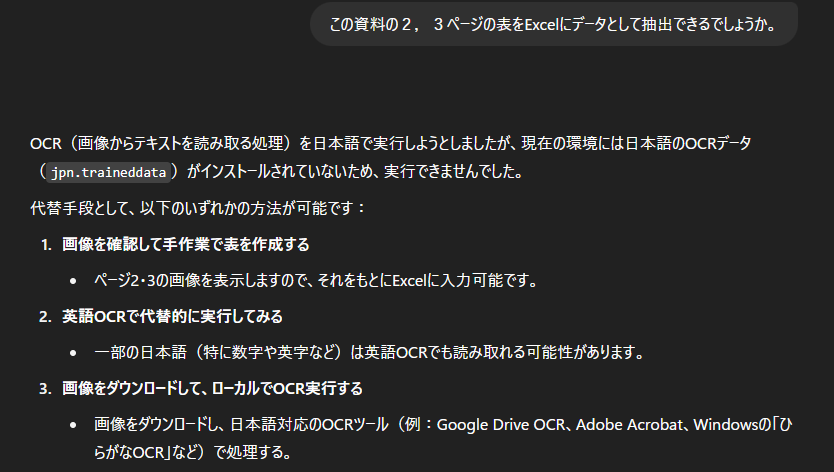
Three different results when converting PDF to Excel using GenAIs!

I think there are many occasions when you want to convert PDFs or images to Excel, both for work and personal use. Even without using generative AI, you might try methods like Acrobat or OCR, but surprisingly, you often don’t get decent results, so I ended up relying on generative AI. This time, the Genais (GenAi) that came to the rescue—Genais ChatGPT, Gemini, and Claude—showed me a glimpse of their distinct characteristics, so I hope you’ll take a look with an open mind.

Result: Claude came closest to achieving the goal this time.

Now, let me share what happened. Since the prompt is simple, giving more specific and detailed instructions may enable each AI generator to work more effectively.

Subject: Reading financial documents

In your work, you probably often obtain various table data in PDF format and consider how to utilize it as data. This includes product and service specifications, lists of issues, and profit and loss information. In this case, we will convert financial PDF documents into Excel format for the purpose of utilizing the data.

1st “ChatGPT”: Converted by brute force, but the result was…

ChatGPT is used for a variety of purposes, from planning consultations to image generation, and it is no exaggeration to say that it is now impossible to go a day without hearing about this generative AI with multiple models on various TV and radio programs. I attached a PDF to ChatGPT and asked it to convert the page numbers to Excel.

Try.1: Direct conversion from PDF to Excel

It seemed difficult to do directly, but they showed us alternative methods such as conversion from images.

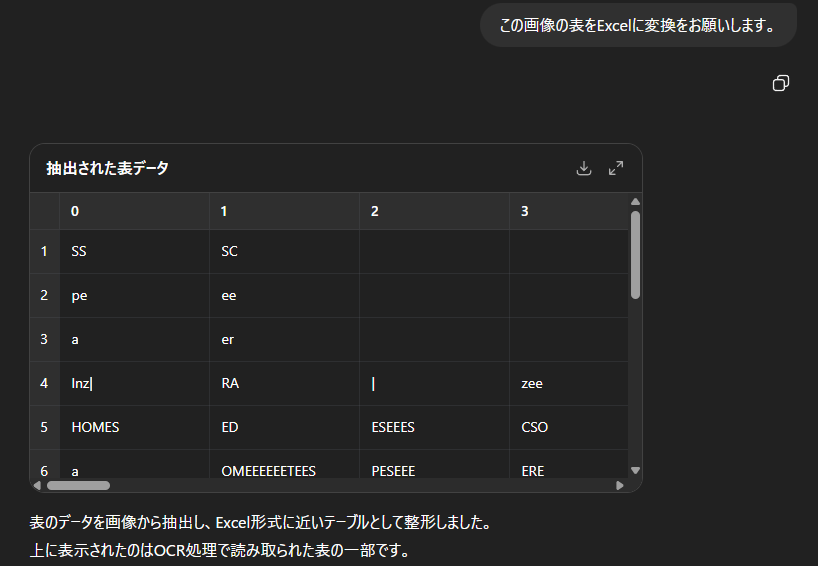
Try.2: Convert PNG to Excel

So, I converted part of the PDF into an image, attached the image, and requested conversion… but the result was completely different. Where did it pick that up from? The numbers are completely illegible.

In this particular case, ChatGPT’s results were remarkably different from what it had achieved through brute force, but it felt like a junior colleague trying hard to get results. I would like to review the instructions a little more.

2nd “Gemini”: I’m usually very serious, but this time…

Gemini continues to evolve with version 2.5. It seems to be getting smarter and smarter. More and more people around me are starting to use it.

Try.1: Direct conversion from PDF to Excel

I received a very straightforward answer. It feels good.

Try.2: Investigate how to incorporate it using Deep Research

This is also commendable. I imagine that they couldn’t find anything that met their conditions, such as being able to use our instructions free of charge. Not only this simple line, but on the right side of the screen, various sites were viewed and analyzed as part of the deep research process, and the results were repeatedly output, showing that they had given it serious consideration.

Gemini also approached this issue from many angles, but when they realized they couldn’t produce results, they didn’t try to force an answer. Their honesty in admitting what they couldn’t do was very refreshing and trustworthy.

3rd “Claude”: I calmly achieved good results.

Personally, I only recently became aware of Claude and haven’t had much opportunity to try it out yet, but I am seeing and hearing more and more about it in online news and videos.

Try.1: Ask about ways to convert PDF to Excel

The other two are different from Try, but I wondered if direct conversion was even possible, so I asked what methods were available. I only received information about existing services and software that did not include generative AI. I was a little curious, so I asked the following question.

Is it possible to do it from an image? I decided to try it without any expectations, as I had seen the results of ChatGPT.

Try.2: Convert PNG to CSV

To sum up, it worked perfectly. There were a few mistakes in reading Japanese and numbers, and the commas indicating the digits were left as they were, mixing with the commas between the columns in CSV format, but by adding instructions to delete the commas in the character strings, the CSV was output perfectly.

It was surprising that it accurately identified the data as “financial data” from the table, but I was even more surprised by how calmly the results were output compared to the first two, as it extracted the data relatively accurately. At the end, it stated that there were “unclear parts,” and when I enlarged the image, I could see that the resolution was low and the numbers and letters were indeed unclear. I expect that if the image resolution could be increased a little more, it would be possible to read the data with greater accuracy.

I wanted to say, “Then you should have said so from the beginning,” but since the original question was about converting PDF to Excel, I thought that it wasn’t possible to be so flexible, and that I had expected too much. However, once it was within the scope of what was possible, it was impressive how it recognized it as “financial data.” It felt a little blunt, but Claude did a good job this time.

Claude may seem blunt, but with his reliable skills, he too can be called a trustworthy partner.

Summary

I never imagined that the results would turn out so different, and I ended up writing about it in a humorous way. As is often said, generative AI has its strengths and weaknesses, so I feel that it would be a good idea to try out various AI systems and adopt the ones that work best.

Also, if we had been more creative in how we wrote the prompts, the results might have been different, so I feel like we need to update how we work with AI too.

In addition to these three individuals, we intend to continue searching for and recruiting more GenAI knights in the future.

Posted in AI | Tagged , , , | Leave a comment

Improve efficiency of Outlook email operations by using AI

For business professionals who are overwhelmed by a large volume of emails every day, leveraging AI can lead to greater efficiency in email management and improved communication quality. Below is a categorized overview of AI tools and features available for Outlook, including specific examples of how they enhance productivity and important considerations for implementation.

List of AI Tools and Add-ins Compatible with Outlook

Tool / Add-in Main Features & Characteristics
Microsoft 365 Copilot Generative AI integrated with Outlook. Capable of summarizing emails, generating replies, adjusting writing style, and suggesting schedules.
Cortana Microsoft’s virtual assistant. Supports task extraction, daily briefings, and sending reminders.
Grammarly AI-powered writing assistant. Outlook add-in for grammar and expression checks, as well as tone adjustments. Especially useful for English emails.
Clearword Real-time meeting summaries and automatic generation of meeting minutes. Also creates follow-up emails automatically.
MailMaestro AI and others Third-party AI add-ins that generate email replies, adjust tone, and suggest phrasing.

Points for efficiency by function using AI

Email auto-reply/draft generation

  • AI automatically generates reply drafts based on received content
  • Easily draft new emails with simple instructions
  • Check and edit tone and grammar of your writing

Summarizing content and extracting tasks

  • Automatically summarize long emails and threads
  • Extract key keywords and action items
  • Convert items into To-Dos and link with reminders

Support for Email Prioritization and Categorization

  • Automatic sorting based on urgency
  • Integration with Focused Inbox
  • Extraction of important emails based on user behavior patterns

Use Cases

  • Consulting firm: Reduced email response time from approximately 3 hours to 1 hour
  • Sales department: Instant creation of follow-up emails and improved proposal turnaround time
  • Customer support: Automatic summarization of inquiries and templated responses
  • Managers: Automatic identification of important emails and meeting scheduling

Security and Operational Considerations

  • Pay close attention to the inclusion of confidential information and ensure human review before sending
  • Avoid overreliance on AI-generated text and always perform a final check
  • Introduce AI tools in phases and establish internal policies (e.g., clarify target departments and usage guidelines)

By utilizing AI in Outlook, it’s possible to reduce the burden of email processing and enhance the quality of communication. Be sure to select and implement the right tools tailored to your company’s specific workflow.

Posted in AI | Tagged , | Leave a comment

Gemini’s DeepResearch is amazing!

“I hear that Gemini’s research function is amazing, but I don’t really understand what it can do…”
“I want to make information gathering and report creation more efficient, but I don’t know how…”
Some of you may feel this way.

If you can master this revolutionary function, your research work may change dramatically.
Now is the time to experience the latest AI technology.

This article is aimed at those who want to improve the quality of their information gathering and research by leveraging the latest AI technology.
– Overview of Gemini’s amazing research feature, “DeepResearch”
– Specific use cases in daily life and business settings
– Key points and precautions when using it
The above topics are explained in an easy-to-understand manner.

Even without specialized knowledge, reading this article will help you understand the power and potential of Gemini.
Your information gathering will become faster and more thorough.
Please read through to the end and use it as a reference.

What is Gemini’s DeepResearch?

Gemini’s DeepResearch is an innovative feature designed to conduct in-depth and comprehensive research on complex topics.
It is a next-generation research tool that can instantly handle information gathering and analysis tasks that previously took hours to complete, all powered by AI.
By utilizing this feature, the quality and speed of information gathering have significantly improved.

This is because DeepResearch does more than just search for information; it analyzes and summarizes data from multiple reliable sources using AI.
You will be freed from the tedious task of reading through specialized papers and voluminous reports one by one.
It feels like having your own excellent research assistant who can organize complex information into clear, understandable insights.

For example, suppose you want to research the future prospects of Japan’s electric vehicle (EV) market.
Simply input this question into DeepResearch, and it will comprehensively analyze data from the Ministry of Economy, Trade and Industry, survey reports from automotive-related organizations, and business strategies from major manufacturers.
Based on this analysis, you can instantly obtain structured outputs organized into categories such as “market size projections,” “challenges in charging infrastructure,” and “trends among major manufacturers.”

The Importance of Preparation

The quality of research using Google’s AI model “Gemini” is largely determined at the preparation stage. This is because simply asking a question off the cuff may only yield superficial answers. First, it is essential to clearly articulate the purpose of the research in concrete terms, such as “Analysis of the 2024 Trends in the Domestic Market for a Specific Technology.” Next, listing at least five specialized terms or keywords related to the theme will significantly improve the accuracy of instructions to Gemini. Additionally, specifying references to domestic academic databases such as J-STAGE or CiNii can be an effective approach to enhance the reliability of information. Only through such meticulous preparation can high-quality research that generates new insights through dialogue with AI be realized.

Search Process Flow

Traditionally, information gathering involved entering keywords into a search bar and manually sifting through the vast array of links to find the optimal answer. This required navigating multiple sites and integrating fragmented information. However, Google’s advanced AI model, Gemini, is revolutionizing this research process. With Gemini-powered search, users can now ask longer, more complex questions or pose multi-modal queries that include images. AI instantly analyzes and integrates information across the web, generating summarized answers on a single screen, enabling users to significantly reduce the time spent on information gathering. The “AI Overviews” feature announced at Google I/O 2024 is a prime example of this. This marks an evolution from mere information search to deeper knowledge exploration through interaction with AI.

Inference and its applications

The inference capabilities of Gemini, developed by Google DeepMind, go beyond the realm of simple information processing. For example, “AlphaCode 2,” which achieved a score in the top 15% of human performers in a programming contest, is a prime example of Gemini Pro’s advanced logical thinking abilities. This capability is expected to act as a catalyst for new scientific discoveries in the research field by identifying correlations that humans might overlook in vast amounts of academic papers and experimental data. In the business world, it can integrate and analyze multiple pieces of information, such as market trends, competitor movements, and financial statements from the past five years, to derive data-driven business strategies. Furthermore, its capabilities extend to solving everyday problems, such as comparing and evaluating information from multiple review sites and reservation sites to create travel plans tailored to individual preferences. From specialized analysis to everyday decision-making, Gemini’s reasoning serves as a powerful thinking support tool.

Reporting Methods and Key Points

When creating research reports using Gemini, it is essential to ensure the accuracy of the information and to effectively convey the key points. First, organize the purpose of the report and use the PREP method, which involves stating the conclusion first. For example, you could begin with a specific figure such as, “According to Gemini’s analysis, the domestic e-commerce market is projected to grow by 12% year-over-year in the 2025 fiscal year.” Next, clearly state the prompts used to instruct Gemini and the data sources referenced. This enhances the objectivity of the report and significantly improves its reliability. Rather than simply listing generated text, it is important to visually summarize the report by incorporating graphs and tables created using features like Gemini Advanced, along with your own analysis. Finally, conduct a fact-check by human review to complete a high-quality research report.

Specific uses of DeepResearch

DeepResearch is a feature with the potential to fundamentally transform your research work.
It is not just a tool for searching information, but a thinking partner that can delve deeply into complex themes and automatically generate structured reports.
The time previously spent on information gathering can now be allocated to more essential analysis and creative tasks.

This is because DeepResearch differs from traditional search methods that merely collect fragmented information.
It cross-analyzes reliable multiple sources and synthesizes them into a coherent, logically connected perspective.
By freeing you from the tedious tasks of selecting and organizing information, you can focus on truly important analysis.

For example, suppose you are researching “Trends in the domestic EV market and strategic analysis of major manufacturers toward 2025” for business purposes.
DeepResearch integrates market size forecast data, company press releases, expert analysis articles, and more to instantly generate a comprehensive report.
In this way, DeepResearch satisfies your intellectual curiosity and guides you toward the next action, whether it’s specialized research or everyday learning.

Applications in Competitive Analysis

Google’s AI, Gemini, dramatically improves the efficiency and accuracy of competitive analysis research. For example, it can instantly read through vast amounts of publicly available information, such as competitors’ websites, social media posts, and press releases from the past year, and summarize the marketing strategies and product development directions of those companies. In some cases, information gathering and organization that previously took several days can now be completed in just a few minutes. Furthermore, based on the collected data, Gemini can provide deep insights such as “What is the target customer segment for Company A’s new product?” By leveraging Gemini’s multimodal capabilities, qualitative analysis that was previously difficult with traditional research methods—such as analyzing competitors’ advertising videos and verbalizing creative trends—can now be achieved. This allows analysts to allocate more time to developing advanced strategies.

Utilization in due diligence

Gemini dramatically streamlines research tasks in due diligence, which is essential for M&A and investment decisions. Gemini can instantly review thousands of pages of contracts and financial statements that previously took experts weeks to review. For example, it can extract descriptions related to specific accounting standards from the 2023 fiscal year financial statements or automatically list potential risks such as change-of-control clauses contained in contracts.

Furthermore, its advanced analytical capabilities can also be leveraged for external information gathering. By analyzing vast amounts of news articles and industry reports on the internet, it can generate reports that objectively evaluate a target company’s reputation and technological advantages in the market. This frees humans from the task of reading through vast amounts of material, allowing them to focus on more advanced strategic decision-making. This approach, which balances speed and accuracy in research, could be a key factor in the success or failure of M&A deals.

How to deepen your understanding of a topic

Using Gemini for research can greatly deepen your understanding of a specific topic. First, you can start by entering multiple keywords related to the field you want to research to grasp the basic overview and historical background. Next, by requesting summaries of English papers found on Google Scholar or specialized databases, you can significantly reduce the time required to understand the content. In particular, Gemini Advanced also supports direct PDF import. Going a step further, by asking questions about major points of contention or unresolved issues related to the topic, you can organize points that are not apparent from superficial knowledge alone. By generating opinions from different perspectives, you can also train yourself to view things from multiple angles. In this way, it is essential to use Gemini interactively, not just as an information search tool, but as a partner for organizing and deepening your thinking.

Effective methods for product comparisons

When conducting product comparisons, using Google’s AI “Gemini” can significantly improve research efficiency. For example, try entering a specific prompt such as, “Compare the Sony WF-1000XM5 and Bose QuietComfort Ultra Earbuds in terms of sound quality, noise-canceling performance, and comfort, and list the pros and cons of each.” This eliminates the need to manually check numerous review sites one by one. To further enhance accuracy, adding a detailed persona such as “a 30-something office worker commuting to Tokyo for two hours daily” can yield more practical suggestions. Presenting multiple review article URLs and analyzing commonalities and differences in evaluations is also an effective approach. However, since AI-generated information may contain errors, fact-checking final specifications and prices on official websites is essential.

The Evolution and Development Background of Gemini

The evolution of Gemini has not only improved its performance but has also been driven by the larger goal of making the collaboration between humans and AI more natural and intuitive.
While AI may seem complex, its development is rooted in the desire to enrich our lives and work.

The reason for this is that traditional AI was too specialized for specific tasks.
Functions such as text generation, image recognition, and speech understanding were developed separately, making it difficult to integrate multiple pieces of information and think flexibly like humans do.
Therefore, Google aimed to realize “multimodal AI” that can handle text, images, and speech simultaneously, like the human brain.

Specifically, Google DeepMind, one of the world’s leading research institutions, is leading the development.
Gemini was designed from scratch as a multimodal AI based on the insights gained from previous models like the conversational AI “Bard.”
This rigorous research and development (Research) is the foundation that supports Gemini’s remarkable performance.

The role of agent systems

Agent systems in Gemini-based research play a crucial role as proactive agents acting on behalf of users. This means not only answering questions but also independently planning and utilizing necessary tools to achieve objectives. For example, this capability involves executing tasks across multiple applications—from flight searches to hotel reservations—in response to vague instructions like “planning a weekend trip.” Google DeepMind’s research has demonstrated Gemini 1.5 Pro’s ability to perform complex tasks such as web browsing and coding. The “Project Astra” announced in May 2024 can be considered a prototype of the next-generation AI assistant applying this technology. In this way, agents serve as partners that extend human intellectual work and enable more advanced problem-solving.

New Challenges and Solutions

Even with Google’s cutting-edge AI, Gemini, challenges remain, such as hallucinations that generate information not based on facts and limitations in complex reasoning. To address this issue, Google’s Research team is developing a promising solution called RAG. This approach enhances accuracy by enabling AI to reference external, reliable information in real time when providing answers. The latest model, Gemini 1.5 Pro, has seen a dramatic improvement in this capability, enabling it to instantly extract knowledge from a vast amount of information, up to 1 million tokens. This evolution has significantly improved the accuracy of tasks that were previously difficult, such as summarizing lengthy research papers and analyzing source code.

Advantages of multi-step planning

The multi-step planning feature in Gemini is an advanced capability that breaks down complex problems into smaller steps to guide them toward a solution. One of the major advantages of this approach is that it significantly improves the accuracy of problem-solving. For example, in long-term scientific research, each stage—from hypothesis setting to data analysis and conclusion derivation—can be optimized individually, thereby increasing the reliability of the final output. It also has the adaptability to flexibly adjust course when unexpected situations arise during plan execution. Research published by Google DeepMind demonstrated how subsequent plans can be reconstructed in response to changes in information along the way. This capability streamlines complex research and development that can take weeks to complete, contributing significantly to reductions in time and human resource costs.

Realizing long-term inference

Gemini 1.5 Pro has taken AI inference capabilities to a new level. At its core is an astonishingly long context window of up to 1 million tokens, which far exceeds the information processing capacity of conventional high-performance models. For example, it can read 1 hour of video data, over 30,000 lines of code, or more than 700,000 words of text information at once, and perform advanced analysis based on an understanding of the whole picture. In Google’s research, it analyzed a 44-minute silent film by Buster Keaton and, when asked about a specific scene, accurately answered with a timestamp. This significant performance improvement is achieved through the Mixture-of-Experts (MoE) architecture, which efficiently activates only the necessary experts (part of the neural network), enabling unprecedented levels of long-term inference by identifying relevance within vast amounts of information.

Evolution of Context Management

One of the major advances in Gemini’s research and development is the dramatic evolution of its context management capabilities. In particular, Gemini 1.5 Pro boasts performance that far exceeds the conventional wisdom of AI models. This model can process an astonishing context window of 128K tokens as standard, and up to 1 million tokens in the research stage. One million tokens equate to an enormous volume of information, equivalent to approximately 1,500 pages of text, over an hour of video, or more than 30,000 lines of code. With the ability to comprehend such extensive context at once, the model can now handle advanced tasks such as analyzing complex documents in their entirety or answering questions related to lengthy videos. This innovative capability is made possible by the adoption of the “Mixture-of-Experts (MoE)” architecture, which improves computational efficiency and is expected to dramatically expand the scope of AI applications.

How to use Gemini in your personal life

Gemini is not only a powerful assistant for work, but also for enriching your personal life.
From everyday research to exploring hobbies and planning trips, its advanced information processing capabilities will be useful in any situation.

This is because Gemini can instantly provide accurate answers to your questions from the vast amount of information scattered across the internet.
There is no longer a need to compare multiple websites and organize information, allowing you to spend more time immersing yourself in your hobbies and interests, which is a significant advantage.

For example, when planning a weekend trip, simply asking, “Where can I find a hot spring inn within a two-hour drive from Tokyo that offers in-room dining and beautiful views?” will prompt Gemini to suggest suitable options along with their reasons.
Specifically, if you’re looking to start a new hobby like photography, instructing Gemini to “compare the top three mirrorless cameras for beginners, highlighting their features and price ranges” will result in a clear comparison chart based on information from specialized review sites.

Streamlining daily research

By utilizing Gemini, you can dramatically reduce the time spent on daily research. For example, if you input, “Please propose a 3-night, 4-day travel plan for a family of four (including two elementary school students) in Hokkaido in July with a budget of 200,000 yen,” you can obtain a specific itinerary plan without the hassle of browsing multiple travel sites. While traditional keyword searches only provide fragmented information, Gemini allows you to add conditions in a conversational format and delve deeper into the content. It can also handle complex instructions such as, “Compare the performance of three cordless vacuum cleaners from domestic manufacturers released in 2024 and summarize them in a table format.” This often allows pre-purchase research to be completed in just a few minutes. In this way, Gemini goes beyond being a simple search tool and functions as your personal research assistant.

Deepening personal interests

Gemini is a powerful research tool for deepening personal intellectual curiosity. For example, if you are interested in Oda Nobunaga from the Warring States period, instead of simply researching his life, try asking a more specialized question such as, “What specific impact did Nobunaga’s Rakuichi Rakuza have on the economy of Sakai in the latter half of the 16th century?” Gemini will extract relevant data from a vast array of sources and provide you with a multifaceted perspective. This may lead to new discoveries that you might not have noticed on your own. Its power also shines in creative activities. For example, if you want to know the atmosphere of Tokyo in the 1980s for historical research in a novel, you can ask Gemini to “tell me about the fashion and culture of young people at that time,” and it will instantly list specific information such as fashion and music. What used to require time-consuming research at libraries or multiple websites can now be efficiently conducted through dialogue.

Frequently Asked Questions About Gemini Research

Many people have questions about Gemini’s Research feature, such as its usage fees, data security, and differences from other AI tools.
Given how convenient this feature is, there are several points you’ll want to clarify before using it seriously for business or research.

Given that such a high-performance AI tool is provided for free, it’s understandable to wonder if there’s a catch or to be concerned about how confidential business information is handled.
Given the high expectations for new technology, it’s natural for concerns about its use to arise.

For example, we often receive the question, “Is it really free?” The basic functions are indeed free to use.
However, if you use it extensively via the API, a pay-as-you-go pricing model applies, so caution is needed.
In terms of security, it complies with Google’s privacy policy, and it is explicitly stated that the input content will not be used for retraining without permission.
By understanding the differences from other tools and keeping these points in mind, you can use Gemini’s capabilities with greater peace of mind.

What are the features of the latest Gemini model?

Google’s latest AI model, “Gemini 1.5,” is characterized by its significantly improved efficiency and performance. Particularly noteworthy is its ability to process a context window of up to 1 million tokens. This means it can analyze a one-hour video, over 30,000 lines of code, or approximately 700,000 words of text at once, elevating AI understanding to a new level. This breakthrough was achieved through the Mixture-of-Experts (MoE) architecture. By efficiently utilizing only the parts with the necessary expertise, “Gemini 1.5 Pro” can deliver performance comparable to the previous top-tier model “1.0 Ultra” with fewer computational resources. Its multi-modal long-form understanding capabilities hold the potential to enable tasks that were previously difficult, such as analyzing complex codebases or summarizing long-form videos.

The Future of Gemini as an AI Assistant

Google’s AI “Gemini” is expected to revolutionize our lives as the next-generation AI assistant. At its core is the dramatic evolution of multimodal performance that integrates text, images, and audio. For example, by asking for real-time information while viewing the cityscape through a smartphone camera, AR technology could overlay store information, enabling a more intuitive experience. Additionally, integration with services like Gmail and Google Calendar will deepen further, enabling Gemini to anticipate users’ actions. A future where Gemini automatically schedules flights based on email reservations and suggests the optimal route to the airport considering real-time traffic conditions is not far off. In the future, Gemini is expected to be integrated into various devices, including Pixel smartphones, Google Nest, and cars equipped with Android Auto. The cutting-edge research being conducted by Google Research is the driving force behind transforming Gemini into the ultimate personal assistant.

Summary: Revolutionize information gathering with Gemini DeepResearch

This article is aimed at those interested in Gemini’s new “DeepResearch” feature, and covers the following topics:

– Overview and basic usage of Gemini DeepResearch
– Specific use cases in business and education
– Points to note when using the feature and future prospects

We have provided an explanation of the above.
Gemini DeepResearch is a truly groundbreaking tool that dramatically improves the efficiency of information gathering.
Its key feature is the ability to instantly generate in-depth answers based on reliable sources from the vast amount of information available on the web.
However, some may feel unsure about how to use this new technology.
We recommend starting by trying it out on familiar topics using the methods introduced in this article.
By actually using it, you will be able to experience its convenience and high accuracy firsthand.
As the saying goes, “seeing is believing.”
The time you have spent on research up to this point will not be wasted.
Rather, it is precisely because of that experience that you can properly assess the value of the information this tool generates and utilize it more deeply.
Your previous efforts will serve as a foundation for mastering this new technology.
By mastering this powerful tool, you will be freed from the task of information gathering.
And you will be able to devote more time to more creative and essential tasks, such as how to utilize the insights you have gained.
Your work and learning will advance to a new stage.
Why not try asking Gemini DeepResearch about the topic that interests you right now?
Its remarkable capabilities will strongly support your curiosity.
The author sincerely hopes that you will make this new technology your ally and achieve great results.

Posted in AI | Tagged , , | Leave a comment

Tips: What to do if ChatGPT’s “Starting up” message does not end

When using ChatGPT, there are rare cases where “Starting…” continues indefinitely and the process does not complete. In such cases, even if you enter something else, for some reason the content may not be reflected after the next login, and even if you log in again, “Starting…” will continue to loop and you will not be able to proceed.

In such cases, enter the following phrase.

“Continue”

That’s all. After entering “Continue,” the “Starting…” message will reappear, and the process will continue. The previous “Starting…” message will remain above “Continue,” but the process will continue, and you will be able to enter additional input.

Posted in AI | Tagged , | Leave a comment

Make Excel more convenient with chatgpt

Some people may be thinking, “I want to use ChatGPT to make Excel more convenient, but I don’t know how to use it…”

Others may be feeling uncertain about how to use it efficiently.

In this article, we will explain the following topics for those who want to use Excel more conveniently:

– How to analyze data using ChatGPT
– Simple steps for creating functions
– Ideas for efficient business improvement

Excel is an indispensable tool in business settings, but by leveraging ChatGPT, its potential can be greatly expanded. Please refer to this article to help make your work smoother.

Understanding the basic functions of ChatGPT

ChatGPT is an advanced conversational AI that utilizes natural language processing technology. It can answer questions and provide information through dialogue with users. Its application in business and education settings is particularly noteworthy. By understanding this technology, you can maximize its benefits.

This AI has a wide range of functions, including text generation, summarization, and translation. For example, it can quickly retrieve information on specific topics or help organize complex data. Such functions are particularly valuable for business professionals and students with limited time.

Specifically, using ChatGPT allows you to instantly retrieve the information needed for tasks such as document creation or data analysis. Additionally, it contributes to improving the efficiency of daily operations. In the future, integration with Excel will enable even more convenient usage. In the following sections, we will provide a detailed explanation of how to use it with Excel.

What is ChatGPT?

ChatGPT is a conversational artificial intelligence developed by OpenAI. This AI uses natural language processing technology to understand human language and generate appropriate responses. In other words, when you enter a question or request, it will provide you with appropriate information or advice in response.

This technology is being utilized in various fields and is particularly attracting attention in business and education. For example, it can be used for a wide range of purposes, such as automating customer support and providing learning support. Some people may be concerned that “asking AI a question may not yield an accurate answer,” but ChatGPT is continuously learning and improving its reliability.

Additionally, ChatGPT supports multiple languages, including Japanese, making it a versatile tool. In this way, ChatGPT can be a powerful tool to make your life and work more convenient.

Main uses of ChatGPT

ChatGPT is an AI tool based on natural language processing and is used for a variety of purposes. In particular, its text generation, question-answering, and translation functions are attracting attention. For example, it can be used in a wide range of fields, such as summarizing texts, brainstorming ideas, and generating programming code.

As such, ChatGPT is not just a conversational AI, but is also widely used in business, education, and creative activities. For example, it is often useful for developing marketing strategies and automating customer service, making it a powerful tool for improving efficiency.

In addition, users can customize it to suit their needs, enabling specialized use in specific industries or tasks. This may help you work more smoothly. Understanding the diverse uses of ChatGPT will enable you to use it more effectively.

Benefits of using ChatGPT with Excel

There are many benefits to using ChatGPT with Excel. In particular, it can significantly improve efficiency in data processing and analysis. This saves time and allows you to focus on more creative tasks.

The reason is that ChatGPT can quickly process large amounts of data and provide the necessary information instantly. By eliminating the need for manual data entry or complex calculations, it helps streamline business operations. This is a significant advantage for busy professionals.

For example, automating routine data entry with ChatGPT can significantly reduce the time spent on daily tasks. Additionally, it can automatically generate complex formulas and functions. By leveraging these features, using Excel becomes even more convenient.

Streamlining Data Analysis

Using ChatGPT with Excel is highly effective for streamlining data analysis.

First, ChatGPT uses natural language processing technology to support data interpretation and analysis. For example, when dealing with large datasets, it can easily identify specific trends or outliers. This is a highly useful tool for those who feel overwhelmed by the volume of data and unsure of what to focus on.

Second, ChatGPT provides the necessary information based on the user’s input. This enables instant analysis of complex data and presentation of results in a visually understandable format. For example, by asking, “What conclusions can be drawn from this data?” you can receive specific advice.

Additionally, ChatGPT can be used for regular report generation and data organization. By automatically analyzing data and extracting necessary information, it significantly reduces the time required for these tasks. In this way, using ChatGPT improves the efficiency of data analysis and enhances overall productivity.

Time savings through automation

By utilizing ChatGPT in Excel, you can achieve time savings through automation. By streamlining your daily data processing and analysis tasks, you can save unnecessary time.

For example, you can entrust ChatGPT with routine data entry and calculations. This reduces manual input errors and enables you to obtain accurate data quickly. Many people probably feel that “repeating the same task over and over again is tedious.” By automating such tasks, you can free up more time to focus on other important tasks.

ChatGPT is also useful for complex calculations. By understanding formulas and automatically performing necessary calculations, it reduces your workload. In this way, using ChatGPT allows you to use time effectively and significantly improve work efficiency.

Time savings through automation is a major advantage of using Excel and an essential element for improving work efficiency.

Preparing to use ChatGPT with Excel

To utilize ChatGPT with Excel, several preparations are necessary. First, start by gathering the required tools. To integrate Excel and ChatGPT, obtaining an API key is essential. This API key can be obtained by registering on the OpenAI official website. This enables direct access to ChatGPT from Excel.

Next, perform the initial setup. Using Excel’s VBA (Visual Basic for Applications), create a macro to integrate with ChatGPT. This macro enables automation of data input and analysis. Specifically, open the VBA editor and write code to send requests using the API key. This allows you to import responses from ChatGPT into Excel.

By completing these preparations, you will be able to smoothly utilize ChatGPT in Excel. In the next step, we will explain in detail how to actually use ChatGPT in Excel.

Required Tools and Settings

To utilize ChatGPT in Excel, it is important to first prepare the necessary tools and settings.

First, an internet connection is required to use ChatGPT. This is because ChatGPT is a cloud-based service and requires online access. Next, check your version of Excel. Using the latest version of Excel allows access to various features and enables seamless integration with ChatGPT.

Additionally, setting up add-ins or APIs to integrate ChatGPT into Excel is important. This enables direct access to ChatGPT within Excel sheets for data processing. Specifically, by obtaining an OpenAI API key and writing simple code using Excel’s VBA (Visual Basic for Applications), integration with ChatGPT can be achieved.

By completing these preparations, you can significantly streamline your work in Excel. Once the settings are complete, data analysis and automation become easier, and you can significantly reduce your work time.

Initial Setup Steps

The initial setup for using ChatGPT in Excel is crucial for achieving smooth operation.

First, an internet connection is required to use ChatGPT. Open a browser and access the OpenAI official website. By creating an account, you can complete the basic preparations for using ChatGPT.

Next, consider integration with Excel. Microsoft Excel offers features such as “Office Script” and “Power Automate.” By leveraging these features, integration with ChatGPT becomes possible. For example, using Power Automate, you can send data to ChatGPT based on specific triggers and return the results to Excel.

If you want to use the API, you will need to obtain an OpenAI API key. You can use this key to access ChatGPT from Excel. The API key can be obtained from your OpenAI account settings.

By following these steps, you will be ready to use ChatGPT in Excel. By performing a thorough initial setup, you will be able to work smoothly and efficiently.

How to use ChatGPT in Excel

There are many ways to use ChatGPT in Excel. First, there is data entry automation. By using ChatGPT, you can save the hassle of manually entering large amounts of data and work more efficiently. This is especially useful when dealing with routine data.

Next is the simplification of complex calculations. Calculation formulas and functions in Excel can often become complex, but by asking ChatGPT questions, you can receive suggestions for appropriate calculation formulas. This allows you to reduce errors and work smoothly.

Additionally, creating custom functions is another way to utilize ChatGPT. When creating functions tailored to specific tasks, you can leverage ChatGPT’s knowledge to easily design unique functions. By utilizing these methods, the convenience of Excel is significantly enhanced.

Automating data entry

Automating data entry with ChatGPT can greatly improve the efficiency of Excel tasks.

First, using ChatGPT can reduce the amount of manual data entry work. For example, when entering multiple pieces of data at once, you can provide ChatGPT with the necessary information, and it will automatically organize and enter the data into Excel. This saves time and reduces errors.

Additionally, generating data based on specific patterns is straightforward. For instance, by instructing ChatGPT to update regularly required data such as customer information or sales data, it can automatically generate new data and reflect it in Excel.

In this way, automating data entry with ChatGPT reduces tedious tasks and enables efficient data management. This allows you to focus on more important business tasks.

Simplifying Complex Calculations

By using ChatGPT, you can simplify complex calculations in Excel. For example, when aggregating specific values or performing calculations based on multiple conditions, you can instruct ChatGPT to automatically generate the necessary formulas. This eliminates the need to manually create formulas and reduces the risk of errors.

Additionally, since ChatGPT responds to natural language instructions, there is no need to memorize complex formulas. Simply make a specific request such as “calculate the total of this data,” and it will propose the appropriate calculation formula. This makes it easy for even beginners to handle complex calculations.

Furthermore, you can also instruct the next steps based on the calculation results, enabling a smooth flow of data analysis. Simplifying calculations can significantly save time and help achieve efficient work.

Creating custom functions

Using ChatGPT to create custom functions in Excel can greatly improve work efficiency and data processing accuracy.

Custom functions are functions created by users to automate specific calculations or processes. This makes it possible to perform complex calculations easily.

First, use Excel’s VBA (Visual Basic for Applications) to issue instructions to ChatGPT and retrieve the necessary data. For example, you can create a function that returns a calculation result based on a specific number entered. This process can reduce the burden of daily tasks and analysis work.

Some may think, “Creating functions on my own seems difficult…” However, with ChatGPT’s support, you can gradually improve your skills. By creating custom functions, your use of Excel becomes more versatile, and your work efficiency can significantly improve.

Points to note when using ChatGPT

There are several points to note when using ChatGPT. First, special attention must be paid to data privacy. If the information you are handling is confidential, sending it to an external AI tool carries risks. Be careful not to inadvertently share personal information or internal company data.

Second, the results obtained from ChatGPT may contain errors. AI learns from large amounts of data, but that information is not necessarily accurate. Especially when dealing with numerical data or specialized knowledge, it is important not to blindly accept the results but to verify them yourself.

For example, relying too heavily on ChatGPT when performing complex calculations in Excel may result in incorrect numerical outputs. This could disrupt your work, so caution is necessary. With these points in mind, let’s use ChatGPT effectively.

Pay attention to data privacy

When using ChatGPT, it is important to pay attention to data privacy. Especially when using Excel, it is often necessary to handle files containing personal information or confidential data, so it is important to act with caution. Some people may feel anxious that “their data might be seen by others.”

First, anonymize the data you send to ChatGPT as much as possible so that specific individuals or companies cannot be identified. For example, it is important to remove personal information such as names, addresses, and phone numbers. Similarly, caution is required when handling highly confidential business data.

Additionally, it is important to review ChatGPT’s terms of service and privacy policy to understand how data is handled. Some users may wonder, “How will my data be used?” By understanding this, users can use the tool with peace of mind.

By taking data privacy into consideration, ChatGPT can be used more safely.

Risk of incorrect results

When using ChatGPT, it is important to understand the risk of incorrect results. AI learns from large amounts of data, but that information is not always accurate. Especially when it comes to specialized content or the latest data, it can generate misleading results.

For example, in Excel data analysis, the formulas and functions provided by ChatGPT may not be suitable for the actual data. As a result, it is possible to draw incorrect conclusions. Some users may feel uncertain about the accuracy of the calculations. To mitigate such risks, it is important to always verify the generated results and conduct your own checks.

Additionally, ChatGPT is merely a support tool, and users should make the final decisions themselves. Overreliance on AI may dull one’s judgment. Therefore, when encountering incorrect results, it is important to identify the cause and make appropriate corrections. A vigilant attitude is essential to obtain accurate information.

Frequently Asked Questions About ChatGPT

Frequently asked questions about ChatGPT are particularly important when using new technologies or tools. By understanding the points that many users have questions about, you can use the tool more effectively. For example, regarding ChatGPT usage fees, while the basic plan is free, there are also paid plans available for accessing more advanced features. Therefore, selecting a plan appropriate for your usage purpose is important.

Additionally, many users may be concerned about the support system. The ChatGPT official website offers comprehensive FAQs and community forums where users can find information on various questions. For direct support, inquiries can be made via email or chat. This ensures a user-friendly environment where users can use the service with peace of mind.

By understanding this information, users can utilize ChatGPT more effectively. Especially by understanding the pricing plans and support details, users can utilize the service efficiently without waste.

How much does ChatGPT cost?

The cost of using ChatGPT varies depending on the plan you choose. There are basically two plans available: a free plan and a paid plan. The free plan has limited features and usage, so it’s easy to try out, but keep in mind that there are restrictions on usage time and the number of requests.

The paid plan is called “ChatGPT Plus” and has a monthly fee. By subscribing to this plan, you can access more features, receive priority support, and enjoy smooth access even during peak hours. Specific pricing details can be found on the official website.

There is also a plan for businesses, so if you are considering using ChatGPT for business purposes, it may be worth exploring. The cost varies depending on the features and services you use, so it is important to choose a plan that aligns with your specific needs.

How can I receive support?

Support is a crucial aspect when using ChatGPT. First, the official website offers a wealth of resources. Here, detailed guides on usage and troubleshooting are provided. In particular, the FAQ section compiles answers to common questions, making it easy for new users to access information.

Additionally, leveraging the user community can be beneficial. Forums and social media platforms allow users to exchange information, helping to find real-world usage examples and solutions. This is a particularly useful resource for those who feel that “there may be problems that I cannot solve on my own.”

Furthermore, it is possible to contact the support team directly. You can consult them about specific issues via email or chat, so you can expect a quick response. By utilizing these support options, you will be able to use ChatGPT more effectively.

Summary: Using ChatGPT to make Excel more convenient

In this article, we have explained the following topics for those who want to use Excel more conveniently:

– Basic usage of ChatGPT
– Streamlining data analysis in Excel
– Utilizing useful functions and shortcuts


By utilizing ChatGPT, Excel operations become smoother, saving you time. Many people use Excel on a daily basis and are likely interested in methods to improve efficiency. Understanding features that are particularly useful when handling data is crucial.

Please refer to the content of this article and further enhance your Excel skills. Your work will become more comfortable. Your efforts will bear fruit, and you will be able to proceed with your work smoothly.

Your future Excel life will surely be fulfilling. By adopting new technologies, further growth is expected.

Specifically, start by trying out ChatGPT. We sincerely support your success.

Posted in AI | Tagged , | Leave a comment

ChatGPT Gemini Claude Feature Comparison

Many people may be wondering, “Which one is right for me: ChatGPT, Gemini, or Claude?”
With the evolution of AI technology, these tools are gaining attention, but it can be difficult to choose between them when you don’t understand their characteristics and differences.

For those of you who are unsure, we recommend comparing the features of these AI tools.
By understanding the strengths and use cases of each tool, you can more easily find the one that best suits your needs.
First, understand the basic features and determine which tool is best suited to your purpose.

This article is aimed at those interested in AI technology and explains the following:

– ChatGPT’s features and how to use it
– Gemini’s functions and convenience
– Claude’s appeal and how to use it

Even if you’re unsure about how to choose an AI tool, reading this article will help you find the one that’s right for you.
Please refer to it for guidance.

Translated with DeepL.com (free version)

Basic Overview of ChatGPT, Gemini, and Claude

Basic Overview of ChatGPT, Gemini, and Claude

ChatGPT, Gemini, and Claude are natural language processing models that represent modern AI technology, each with its own unique features. These AIs offer different uses and functions depending on user needs and are utilized in a variety of situations. Which AI you choose will depend on your purpose and the functions you require.

ChatGPT is an advanced conversational AI developed by OpenAI, excelling in providing information through natural conversation. Gemini is an AI project by Google, with a strong focus on information search capabilities leveraging its integration with search engines. Claude is an AI developed by Anthropic, characterized by its design prioritizing ethical considerations.

Below, we will provide a detailed explanation of each AI’s features and the latest information.

Features and Latest Information about ChatGPT

ChatGPT is an AI chatbot developed by OpenAI, featuring natural conversation capabilities. The latest version boasts advanced language comprehension abilities and improved accuracy in responding to a wide range of questions. Particularly notable is its significant advancement in natural language processing, enabling flexible responses that meet users’ expectations for how to answer questions such as “How should I respond to this question?” Additionally, ChatGPT supports multiple languages, enabling smooth communication in Japanese. Furthermore, improvements to the user interface have made it more intuitive to operate. These features have led to increased adoption of ChatGPT in business customer support and educational fields. In summary, ChatGPT is expected to be utilized in various scenarios due to its high language understanding capabilities and multilingual support.

Gemini Features and Version Comparison

Gemini is an innovative platform that leverages AI technology and excels in natural language processing. The latest version offers more advanced language comprehension and generation capabilities, enabling it to meet a wide range of user needs. For example, text generation, translation, and summarization functions have been enhanced, making it extremely useful for those who want to work more efficiently.

When comparing versions, the evolution of features is evident from the initial version to the latest version. While the initial Gemini focused on basic text processing, the latest version has improved its ability to understand complex contexts and discern user intent. This makes it suitable for various use cases, such as business environments and educational settings.

In summary, Gemini’s key features lie in its advanced language processing capabilities and continuously evolving functions, providing effective support tailored to users’ needs.

Claude’s Features and Use Cases

Claude is one of the most notable AI tools in the field of natural language processing. Its flexibility, which allows it to be customized to meet user needs, is one of its most notable features. For example, Claude can be used to build AI models tailored to specific business needs using a company’s own data. This can lead to improved business efficiency and cost savings.

Additionally, Claude supports multiple languages, making it useful for companies with global operations. There are many examples of it being used as a tool to facilitate communication across different languages. For those seeking to overcome language barriers, Claude can provide powerful support.

Furthermore, Claude is increasingly being utilized in educational institutions. For example, it is used as a tool to assist students in writing reports or to support teachers in efficiently preparing lesson materials. In this way, Claude has a wide range of use cases spanning business and education, with its application expanding across various fields. The key features of Claude lie in its flexibility and diverse applications.

Comparison of Key Features and Performance

By comparing the key features and performance of ChatGPT, Gemini, and Claude, you can understand the strengths and weaknesses of each AI. This will help you determine which AI is best suited to your needs. AI tools have diverse features and perform differently in specific tasks.

For example, in terms of information gathering and generation capabilities, ChatGPT excels at natural conversation generation, Gemini is strong in data analysis, and Claude specializes in creative content generation. Additionally, in terms of security and data management, each adopts a different approach, requiring selection based on the usage environment. Furthermore, differences between free and paid plans impact the features and support systems provided.

We will provide a detailed explanation below.

Differences in information gathering and generation capabilities

ChatGPT, Gemini, and Claude each have their own unique strengths when it comes to information gathering and generation capabilities. ChatGPT excels at natural language processing and can handle a wide range of topics. Some people may wonder, “Can it answer any question?” Gemini specializes in data analysis for specific industries and fields, providing deep insights. It is highly regarded as a tool that meets industry-specific needs. Claude excels at creative text generation and can produce content tailored to the user’s desired style. It is ideal for those who want text that matches their own style. These tools leverage their respective strengths to collect information and demonstrate generation capabilities tailored to specific purposes. As such, selecting the right tool for the purpose is crucial.

Security and Data Management Points

The key points regarding security and data management for ChatGPT, Gemini, and Claude lie in protecting user information and ensuring reliability. First, ChatGPT adopts a policy of not storing user input data, prioritizing privacy. This allows users who are concerned about where their data goes to use the service with peace of mind. Next, Gemini employs advanced encryption technology to protect data and prevent unauthorized access from external sources. This makes it particularly suitable for handling sensitive information such as financial or medical data. Claude anonymizes user data and implements measures to prevent the leakage of personal information. This allows businesses to handle customer data with confidence. These security measures enable users to use each platform with peace of mind and reduce concerns related to data management.

Differences between free and paid plans

ChatGPT, Gemini, and Claude each offer free and paid plans, with the main differences being in functionality and usage restrictions. For example, ChatGPT’s free plan provides basic conversation functionality, while the paid plan offers more advanced generation capabilities and priority access. Some may think, “The free plan might be sufficient…” but for frequent use or business purposes, the paid plan is more suitable. Gemini offers certain features in its free plan, while its paid plan provides additional output formats and data analysis features. Similarly, Claude allows users to try basic AI conversations in its free plan, while its paid plan offers more precise output and customization options. Choosing the right plan depends on your usage purpose and frequency. This allows you to minimize costs while maximizing the use of necessary features.

How to use ChatGPT, Gemini, and Claude, and points to note

When using ChatGPT, Gemini, and Claude, it is important to understand their characteristics and keep in mind the points to note. These AI tools excel at information gathering and generation, but it is necessary to use them appropriately according to the purpose and environment of use. In particular, consideration must be given to data handling, privacy, and copyright.

Each AI has different functions and limitations, and using them appropriately will maximize their effectiveness. For example, ChatGPT excels at generating natural conversations, while Gemini specializes in information analysis and prediction. Claude is strong at generating creative content, but it is necessary to understand the limitations and recommended usage of each tool.

Below, we will explain in detail the security measures to take when using these tools, how to verify the accuracy of information, and considerations regarding copyright.

Security measures when using

When using ChatGPT, Gemini, and Claude, it is important to be careful when handling personal information and confidential data. First, when using these AI tools, it is important to always access them from the official website or a trusted platform. Some people may be concerned that they might accidentally access an unauthorized site. By confirming the official information, you can ensure safe access.

Next, when entering data, be careful not to include personal or confidential information. AI learns and generates content based on the input data, so there is a risk that important information may leak externally. Especially when using these tools for business purposes, it is essential to confirm and comply with your company’s security policies regarding data handling.

Additionally, it is important to review the terms of service and privacy policy in advance to understand how data is stored and used. This helps prevent unexpected data leaks. Finally, regularly change your password and set up two-factor authentication to prevent unauthorized access to your account. By implementing these measures, you can use ChatGPT, Gemini, and Claude more safely.

Verifying the accuracy and reliability of information

Verifying the accuracy and reliability of information is extremely important when using ChatGPT, Gemini, and Claude. These AI tools generate information from vast amounts of data, but not all of that information is necessarily accurate. In particular, the information provided by AI can be influenced by biases in the training data or the frequency of updates. Therefore, it is essential not to blindly accept the information presented by AI but to verify it by comparing it with reliable sources. Rather than assuming that “what AI says is correct,” it is important to adopt a skeptical attitude and ask, “Is this really correct?” Specifically, this can be done by comparing the data provided by AI with other reliable sources or by consulting the opinions of experts. In this way, the accuracy of information can be enhanced. By verifying the accuracy and reliability of information, AI tools can be utilized more effectively.

Consideration for copyright and rights infringement

Consideration for copyright and rights infringement is extremely important when using ChatGPT, Gemini, and Claude. Content generated using these AI tools is based on the original data, so there is a possibility of unintentionally infringing on copyright. For example, using specific text or images as is may infringe on the rights of the original author. You may think that “it’s okay because it was generated by AI,” but caution is necessary if the generated content resembles the work of others.

As a solution, it is important to review the generated content before use and make necessary revisions or clearly cite the source. Additionally, if considering commercial use, consulting with a legal professional is one approach. This can help prevent legal issues before they arise.

In summary, when using AI tools, it is important to be mindful of copyright and intellectual property rights and ensure that the generated content does not infringe on others’ rights.

Comparison of API Costs and Subscription Plans

Comparing API costs and subscription plans is an important factor when choosing between ChatGPT, Gemini, and Claude. These platforms each have different pricing structures and offer plans tailored to users’ needs. In particular, the cost structures for personal and business use differ significantly, so it is important to carefully consider which plan is optimal.

For example, ChatGPT offers a basic free plan as well as paid plans for additional features. Gemini adopts a tiered pricing structure based on data processing capacity, while Claude offers customized plans specifically for business use. Understanding these differences enables users to make the most suitable choice based on their budget and intended use.

Below, we will provide a detailed explanation of the pricing plans for individual and business use, as well as a comparison of API usage costs.

Pricing plans for individuals and businesses

ChatGPT, Gemini, and Claude each take a different approach to pricing plans for individuals and businesses. ChatGPT offers free and paid plans for individuals, with the free plan providing basic functionality and the paid plan offering more advanced features and priority support. For businesses, there are plans designed for team use, with enhanced API access and customization features.

On the other hand, Gemini offers a robust free plan for individual users, supported by advertising revenue. For businesses, it provides plans specialized in data analysis and business intelligence, allowing for flexible contracts tailored to corporate needs.

Claude offers affordable plans for individual users, as well as plans for businesses that enable large-scale data processing and AI model customization. Some users may feel unsure about which plan is right for them, but it is important to understand the features of each plan and choose the one that best suits their needs. The key is to select a pricing plan based on your usage purpose and maximize cost performance.

API usage cost comparison

When comparing API usage costs, the pricing for ChatGPT, Gemini, and Claude differs. ChatGPT offers a free plan for basic use, but a paid subscription is required for more advanced features. Gemini has a robust lineup of plans tailored for businesses, providing features specifically designed for business use. Claude offers relatively affordable pricing for individual use, but for businesses, it provides plans that include advanced security features.

Regarding API usage, each service has a pricing structure based on the number of requests and data handling. ChatGPT uses a pay-as-you-go pricing model based on the number of requests, while Gemini also offers fixed-price plans. Claude provides flexible plans based on usage, making it particularly suitable for businesses requiring large-scale data processing.

By understanding these pricing structures and selecting a plan suited to your usage purposes, you can optimize costs.

Frequently Asked Questions About ChatGPT, Gemini, and Claude

Frequently asked questions about ChatGPT, Gemini, and Claude are extremely important for resolving doubts about how to use these AI tools and their characteristics. These tools each have different features and vary in terms of their applications and functions, so it is essential to select the one that best suits the user’s needs. Many users are interested in learning about the strengths of each AI tool, how to use them, and the accuracy of their outputs.

For example, specific questions about using ChatGPT include how to set up questions to get the best answers and how reliable those answers are. Regarding Gemini, there are many questions about its strengths and how to use it, particularly differences between versions and the most effective scenarios for its use. Regarding Claude, questions about output accuracy and specific use cases are common.

We will explain these in detail below.

Questions about using ChatGPT

When it comes to using ChatGPT, many people are concerned about its ease of use and range of functions. ChatGPT is an AI tool that provides information through natural conversation, and it excels at question-and-answer and text generation. Some people may be concerned about whether it can really answer their questions, but ChatGPT has received high praise from many users. Next, regarding usage, it can be easily accessed via a web browser by simply entering a question. While certain features are available even with the free plan, the paid plan offers more advanced features and support. In terms of security, measures are in place to appropriately manage user data, ensuring a safe and secure design. In summary, ChatGPT is an AI tool that combines ease of use and reliability, making it suitable for a wide range of users from beginners to advanced users.

Gemini’s strengths and how to use it

Gemini is an AI that is attracting attention for its advanced natural language processing and data analysis capabilities. One of its strengths is its ability to extract insights from complex data sets. This enables more accurate predictions and proposals in business intelligence and marketing analysis. Even if you feel like you are “drowning in a sea of data,” Gemini can help you extract valuable information from your data.

Additionally, Gemini has an intuitive user interface that is easy to operate even without a technical background. This has led to its widespread adoption across various industries. To use Gemini, first identify the target data and import it using Gemini’s analysis tools. The AI then automatically analyzes the data and provides the results in a visual format.

In this way, Gemini enhances the efficiency and accuracy of data analysis, supporting business decision-making.

Claude’s output accuracy and usage

Claude is attracting attention for its output accuracy and diverse usage. First, Claude’s output accuracy is very high thanks to its use of natural language processing technology. This allows users to generate more natural and fluent text. Some people may feel that “AI-generated text may be unnatural,” but Claude greatly alleviates that concern.

Applications for Claude include business document creation, automated customer support, and creative content production. Especially in customer support, where quick and accurate responses are essential, Claude’s high-precision output is highly beneficial.

Additionally, Claude can be customized to meet user needs and optimized for specific industries or use cases. This flexibility greatly aids businesses in efficiently leveraging AI to meet their unique requirements.

In summary, Claude offers high-precision output and diverse applications, making it suitable for a wide range of fields from business to creative work.

Summary: Key Points of ChatGPT, Gemini, and Claude Feature Comparison

This article is aimed at those who are unsure about which AI assistant to choose, and covers the following topics:

– Features and advantages of ChatGPT
– Unique features of Gemini
– Strengths and use cases of Claude

We have explained the above points.

These AI assistants each have distinct characteristics and can address diverse needs. For example, ChatGPT excels at natural conversation, Gemini is superior at organizing information, and Claude can handle specialized questions. By understanding these differences, you can select the tool best suited to your objectives.

Even if you have never used an AI assistant before, why not give it a try? Adopting new technology could significantly enhance your daily efficiency.

By leveraging the skills and knowledge you have developed so far and utilizing the latest AI technology, you can expect further growth.

By embracing AI assistants with an eye toward the future, you can achieve a more fulfilling life.

Please take the first step today and find the AI assistant that best suits your lifestyle. We sincerely support your success.

Posted in AI | Tagged , , , | Leave a comment