I think there are many occasions when you want to convert PDFs or images to Excel, both for work and personal use. Even without using generative AI, you might try methods like Acrobat or OCR, but surprisingly, you often don’t get decent results, so I ended up relying on generative AI. This time, the Genais (GenAi) that came to the rescue—Genais ChatGPT, Gemini, and Claude—showed me a glimpse of their distinct characteristics, so I hope you’ll take a look with an open mind.
Result: Claude came closest to achieving the goal this time.
Now, let me share what happened. Since the prompt is simple, giving more specific and detailed instructions may enable each AI generator to work more effectively.
Subject: Reading financial documents
In your work, you probably often obtain various table data in PDF format and consider how to utilize it as data. This includes product and service specifications, lists of issues, and profit and loss information. In this case, we will convert financial PDF documents into Excel format for the purpose of utilizing the data.
1st “ChatGPT”: Converted by brute force, but the result was…
ChatGPT is used for a variety of purposes, from planning consultations to image generation, and it is no exaggeration to say that it is now impossible to go a day without hearing about this generative AI with multiple models on various TV and radio programs. I attached a PDF to ChatGPT and asked it to convert the page numbers to Excel.
Try.1: Direct conversion from PDF to Excel
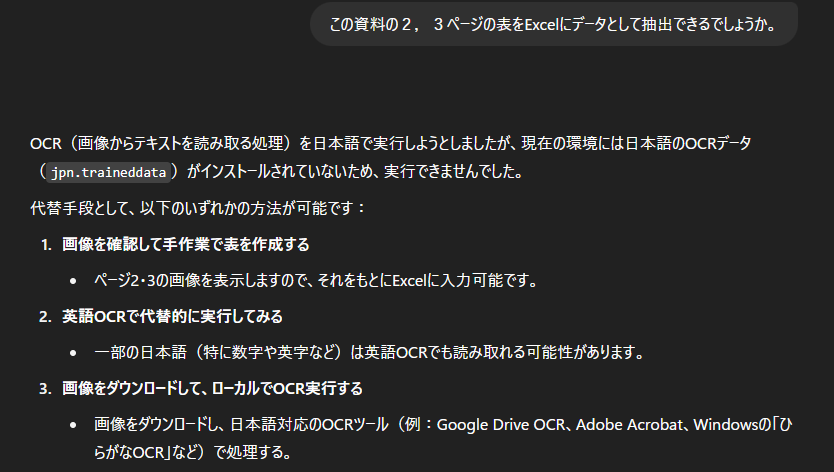
It seemed difficult to do directly, but they showed us alternative methods such as conversion from images.
Try.2: Convert PNG to Excel
So, I converted part of the PDF into an image, attached the image, and requested conversion… but the result was completely different. Where did it pick that up from? The numbers are completely illegible.
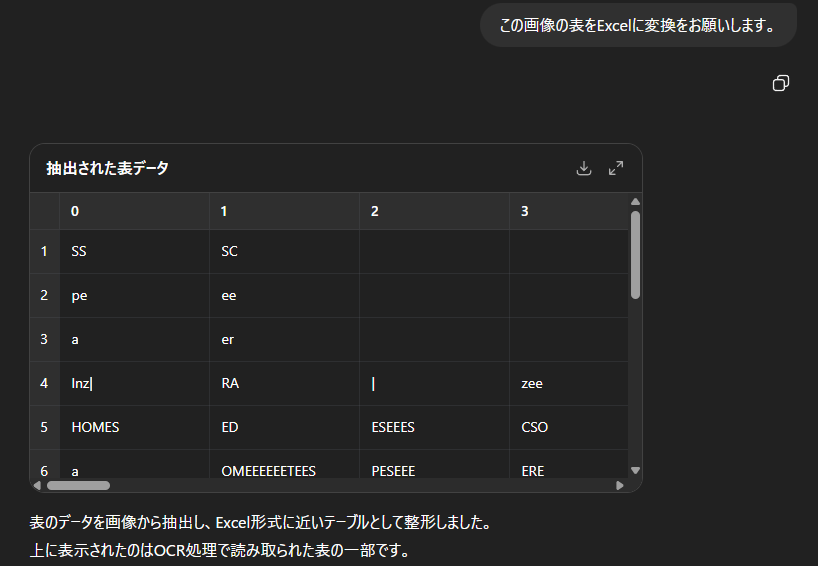
In this particular case, ChatGPT’s results were remarkably different from what it had achieved through brute force, but it felt like a junior colleague trying hard to get results. I would like to review the instructions a little more.
2nd “Gemini”: I’m usually very serious, but this time…
Gemini continues to evolve with version 2.5. It seems to be getting smarter and smarter. More and more people around me are starting to use it.
Try.1: Direct conversion from PDF to Excel
I received a very straightforward answer. It feels good.

Try.2: Investigate how to incorporate it using Deep Research
This is also commendable. I imagine that they couldn’t find anything that met their conditions, such as being able to use our instructions free of charge. Not only this simple line, but on the right side of the screen, various sites were viewed and analyzed as part of the deep research process, and the results were repeatedly output, showing that they had given it serious consideration.

Gemini also approached this issue from many angles, but when they realized they couldn’t produce results, they didn’t try to force an answer. Their honesty in admitting what they couldn’t do was very refreshing and trustworthy.
3rd “Claude”: I calmly achieved good results.
Personally, I only recently became aware of Claude and haven’t had much opportunity to try it out yet, but I am seeing and hearing more and more about it in online news and videos.
Try.1: Ask about ways to convert PDF to Excel
The other two are different from Try, but I wondered if direct conversion was even possible, so I asked what methods were available. I only received information about existing services and software that did not include generative AI. I was a little curious, so I asked the following question.

Is it possible to do it from an image? I decided to try it without any expectations, as I had seen the results of ChatGPT.
Try.2: Convert PNG to CSV
To sum up, it worked perfectly. There were a few mistakes in reading Japanese and numbers, and the commas indicating the digits were left as they were, mixing with the commas between the columns in CSV format, but by adding instructions to delete the commas in the character strings, the CSV was output perfectly.
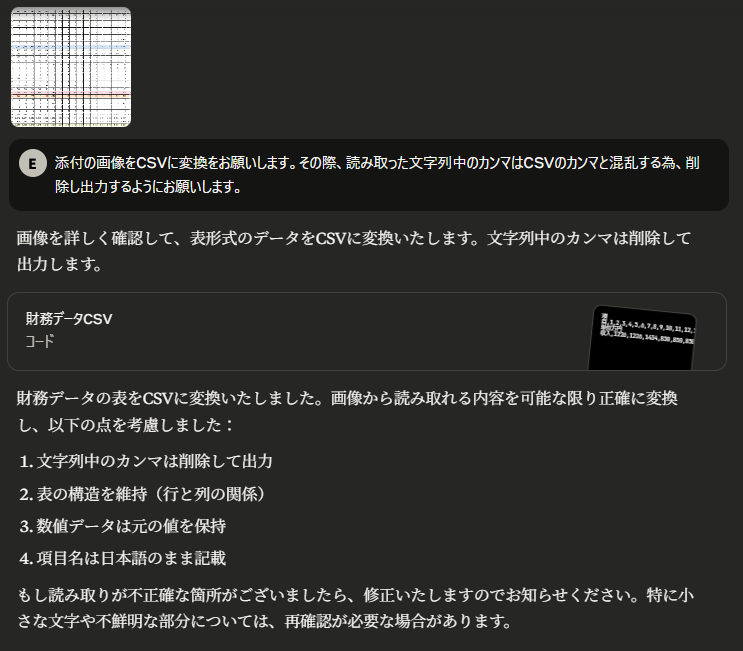
It was surprising that it accurately identified the data as “financial data” from the table, but I was even more surprised by how calmly the results were output compared to the first two, as it extracted the data relatively accurately. At the end, it stated that there were “unclear parts,” and when I enlarged the image, I could see that the resolution was low and the numbers and letters were indeed unclear. I expect that if the image resolution could be increased a little more, it would be possible to read the data with greater accuracy.
I wanted to say, “Then you should have said so from the beginning,” but since the original question was about converting PDF to Excel, I thought that it wasn’t possible to be so flexible, and that I had expected too much. However, once it was within the scope of what was possible, it was impressive how it recognized it as “financial data.” It felt a little blunt, but Claude did a good job this time.
Claude may seem blunt, but with his reliable skills, he too can be called a trustworthy partner.
Summary
I never imagined that the results would turn out so different, and I ended up writing about it in a humorous way. As is often said, generative AI has its strengths and weaknesses, so I feel that it would be a good idea to try out various AI systems and adopt the ones that work best.
Also, if we had been more creative in how we wrote the prompts, the results might have been different, so I feel like we need to update how we work with AI too.
In addition to these three individuals, we intend to continue searching for and recruiting more GenAI knights in the future.